Showing posts with label fujitsu. Show all posts
Showing posts with label fujitsu. Show all posts
Wednesday, September 25, 2013
Fujitsu Lifebook S561 Specifications Notebook
 Notebook Fujitsu - Fujitsu Lifebook S561 is present to support a variety of activities aimed at mobile professionals and businesses with a rather high price. Are you a professional person? Or a businessman? If so, then this notebook could be a reference for you and consider the following brief review.
Lifebook S561 using a screen size of 13.3 inch and weighs less than 2kg load that is suitable for you to carry it everywhere.
For design, this notebook presents an unusual design, but many of the facilities provided to support your daily performance and premium impressed.
This notebook uses an Intel 2.50GHz Core i5-2520M. Available memory capacity 4GB DDR3-1333 and Intel HD graphics card is integrated.
To run a middle-class applications can run smoothly.
Lifebook S561 also supports the entertainment for you to play movies or playing games, so the game can run smoothly, doing the standard settings.
To support your activities, Fujitsu Lifebook S561 provides a variety of connectivity: USB 2.0 ports (three fruits), Lan, HDMI port, RJ11 port, VGA port, card reader, Express card. RJ 11 port analog mode is useful for connecting to the notebook located on the back.

Lifebook S561 also provided security to protect your data with a fingerprint, a system with fingerprint protection.
Value of the test results
PC Mark 7Pro V1.0.04: 2271
Sysmark 2012 V1.0.0.54: 114
Cinebench R115: 2.87
3D Mark Vantage: P1701
Encoding Audio: 1 Minute 25 Seconds
Encoding Video: 21 Minutes 57 Seconds
Battery Life
write Text: 6 Hours 44 Minutes
Play the Video HD: 2 Hours 31 Minutes
+: Lots of facilities and connectivity. Long battery life. Mild. Long-time Warranty
-: Graphic Standards. Price is rather expensive

Fujitsu Lifebook S561 Specifications
Opersi System: Windows 7 Professional 64bit
Processor: Intel Core i5-2520M, Speed 2.5GHz, 2MB L3 Cache
Chipset: Intel Cougar Point QM 67. Intel Sandy Bridge
Screen: 13.3 inch, Resolution 1366x768
RAM: 4GB DDR3-1333
Hard Disk: 640GB 5400RPM SATA-2
Graphics card: Intel HD Graphics Family
Optical Drive: TSST corp CDDVDW
Sound Card: Realtek ALC 269
Connection: Bluetooth, Wi-Fi bgn 802, USB 2.0 (3), HDMI, Ethernet, RJ 11 Port, VGA Port, Web Cam, Card Reader, Fingerprint, Express Card.
Size: 32.1Cm x 3.4-x 22.8Cm 3.8Cm
Weight: 1.9Kg
Warranty: 3 Years
4.5

Friday, July 19, 2013
Fujitsu LifeBook LH530

If you are looking for a notebook with high performance but still cheap, maybe you could try the new Fujitsu LifeBook LH530. With a view that is user friendly and a choice of black and shiny red pomegranates, making it perfect for any novice user. LifeBook LH530 is the type that everyone loves.

LifeBook LH530 has dimensions of 340 x 245 x 35 mm and weighs 2.2 Kg. Using a spill-resistant keyboard that protect it from accidental spills of water. With a 14-inch SuperFine HD back-light LED 220nits (1366 x 768 pixels), will give you a perfect picture and watch movies more enjoyable. LH530 also has a 1.3 MP camera and two stereo microphones.

LifeBook LH530 using the Intel Core i3-330, 2 GB RAM DDR 3 and Windows 7 operating system, so it will give you double performance.

Specifications Fujitsu LifeBook LH530
Processor: Intel Core i3-330M processor (2.13GHz, 3MB cache)
Chipset: Intel HM55 Express Chipset
Operating System: Genuine Windows 7 Home Basic 64-bit
Memory: 2GB DDR3 1066MHz
Hard Drive: 320GB SATA-150 5400rpm, SMART support, Two Partitions - 50/50
Optical: Dual-Layer Super-Multi DVD Writer
Display: 14 inch SuperFine HD back-light LED 220nits, 1366 x 768 pixels
Video Card: Intel HD Graphics
WiFi: Wireless network connection WLAN 802.11bgn
Ethernet: Ethernet 100/10Mbps
Bluetooth: Bluetooth v2.1 EDR
Webcam: 1.3 Mega Pixels camera
Card Reader: Secured Digital / SDHC / Memory Stick / Memory Stick PRO
Audio: RealTek ALC269 HD audio codec with dual built-in stereo speakers, HD Audio-in: External Mic-in, Analog Built-in Microphone, HD Audio-out: Headphone-out
I / O Ports: USB 2.0 x 3, VGA (external display), RJ45 (LAN), HDA-out, Power Adapter DC-in
Battery: Up to 3.5 hrs (6cell Li-ion 4400mAh), Input AC 100 ~ 240V, Output DC 19V 60W
Size (WxDxH) mm: 340mm (W) x 245mm (D) x 35mm (H)
Weight (Est): Approx. 2.2kg
Friday, July 12, 2013
Fujitsu Celsius H710 Review

Fujitsu workstation, H710, is a possible alternative to a workstation that could be used to stop because of its 15.6-inch screen Full HD, NVIDIA GeForce 1000M graphics and an Intel Core i7 2920QM CPU. Can the duo that consists of a Quad Core processor and Nvidia GeForce 1000M.
Fujitsu CELSIUS H710 WXP11DE offers high-performance workstations, "small" 15.6-inch laptop. Mobile workstation features a second generation (Sandy Bridge) Intel Quad Core and high-performance NVIDIA graphics. Without the display, a 15.6-inch diagonal screen, resolution of 1920x1080 pixels (full HD).
Dedicated to the Quadro 1000M graphics card, which has 96 cores are optimized for computer-aided design, digital content creation, geographic information systems, architecture, design, construction and medical imaging.
Laptop can connect to the Internet virtually anywhere WLAN, Bluetooth and UMTS. Celsius H710 has expanded the security functions, such as a fingerprint reader or Computrace to protect against data theft device or a laptop should be stolen.
The list of features of the workplace sounds good: The first is the Core i7-2820QM quad-core 2.3 GHz and an NVIDIA Quadro 1000M with 2048 MB of video memory. A 265 GB SSD (Solid State Drive) is used as data memory in our H710. DDR3 RAM is equipped with 8 GB of this model can be extended up to 16 GB
Specifications Fujitsu Celsius H710 WXP11DE :
Intel Core i7 2820QM used in workstations from Fujitsu, the Celsius H710. This CPU is a quad-core processor and is based on Sandy Bridge architecture. The processor has four cores and can handle up to eight threads simultaneously, thanks to the support Hyper Threading.
2820QM Core i7 is down to 2.3 GHz single-core can sometimes be automatically overclocked up to 3.4 GHz Turbo Boost technology. The processor is a Level 3 MB L3 cache, and is made of 32 nm technology.
The Nvidia GeForce 1000M is built into the system model for graphics. The graphics card has its own 2 048 MB of video memory. GPU runs at a clock of 700 MHz. As competition from Dell, HP and Lenovo also partly based on the height of the Quadro 2000M, Fujitsu now has an opportunity to strengthen the GPU.
Intel has also integrated a DirectX 10 compatible Intel Graphics HD 3000 graphics card and the memory controller into the processor Sandy Bridge. The HD graphics processors are not used in Celsius H710. The user can not switch between integrated and dedicated graphics card is in the BIOS or Windows via the GPU driver. The Celsius H710 Notebook Quadro 1000M user alone.
The CPU clock speed up to 3.4 GHz only remained available to a die temperature of about 80 degrees Celsius in the stress test. Turbo mode is not fully exploited further. The CPU clock set between 2.3 and 2.5 GHz base clock was stable at a minimum of 2.5 GHz in our hour-long simulated stress test - a couple of software-intensive to while this (Prime95, Furmark). Therefore, turbo boost, you can even keep the rate above the base clock, in this case.
Fujitsu CELSIUS H710 WXP11DE offers high-performance workstations, "small" 15.6-inch laptop. Mobile workstation features a second generation (Sandy Bridge) Intel Quad Core and high-performance NVIDIA graphics. Without the display, a 15.6-inch diagonal screen, resolution of 1920x1080 pixels (full HD).
Dedicated to the Quadro 1000M graphics card, which has 96 cores are optimized for computer-aided design, digital content creation, geographic information systems, architecture, design, construction and medical imaging.
Laptop can connect to the Internet virtually anywhere WLAN, Bluetooth and UMTS. Celsius H710 has expanded the security functions, such as a fingerprint reader or Computrace to protect against data theft device or a laptop should be stolen.
The list of features of the workplace sounds good: The first is the Core i7-2820QM quad-core 2.3 GHz and an NVIDIA Quadro 1000M with 2048 MB of video memory. A 265 GB SSD (Solid State Drive) is used as data memory in our H710. DDR3 RAM is equipped with 8 GB of this model can be extended up to 16 GB
Specifications Fujitsu Celsius H710 WXP11DE :
- Processor : Intel Core i7 2820QM 2.3 GHz
- Mainboard : Intel QM67
- Memory : 8145 MB, Micron 16JSF51264HZ-1G4D1
- Graphics adapter : NVIDIA Quadro 1000M - 2048 MB, Core: 700 MHz, Memory: 900 MHz, GF108, 8.17.12.6640 - nVIDIA ForceWare 266.40
- Display : 15.6 inch 16:9, 1920x1080 pixel, glossy: no
- Harddisk : Toshiba THNSFC256GBSJ, 256GB CJFA0203
- Soundcard : Intel Cougar Point PCH - High Definition Audio Controller
- Connections : 1 PC-Card, 1 Express Card 54mm, 3 USB 2.0, 1 USB 3.0, 1 VGA, 1 DisplayPort, 1 Kensington Lock, 1 eSata, Audio Connections: 1 out, 1 in, Card Reader: SD/MS/MSPro, 1 SmartCard, 1 Fingerprint Reader,
- Networking : Intel 82579LM Gigabit Network Connection (10/100/1000MBit), Intel Centrino Advanced-N 6205 (abgn), 2.1 Bluetooth, 3G Mobile Broadband
- Optical drive : TSSTcorp CDDVDW TS-L633F
- Size : height x width x depth (in mm): 36 x 372 x 255
- Weight : 2.75 kg
- Battery : 84 Wh Lithium-Ion, 8 cells, 5.800 mAh
- Price : 2200 Euro
- Operating System : Microsoft Windows 7 Professional 64 Bit
- Additional features : Webcam: 2 Megapixel webCAM, Adobe Acrobat Reader Application Panel Display Manager EasyGuide Nero Essentials S Norton Internet Security Power Saving Utility ShockSensor Utility SmartAccess Plugfree Network Fujitsu Recovery , 36 Months Warranty.
Intel Core i7 2820QM used in workstations from Fujitsu, the Celsius H710. This CPU is a quad-core processor and is based on Sandy Bridge architecture. The processor has four cores and can handle up to eight threads simultaneously, thanks to the support Hyper Threading.
2820QM Core i7 is down to 2.3 GHz single-core can sometimes be automatically overclocked up to 3.4 GHz Turbo Boost technology. The processor is a Level 3 MB L3 cache, and is made of 32 nm technology.
The Nvidia GeForce 1000M is built into the system model for graphics. The graphics card has its own 2 048 MB of video memory. GPU runs at a clock of 700 MHz. As competition from Dell, HP and Lenovo also partly based on the height of the Quadro 2000M, Fujitsu now has an opportunity to strengthen the GPU.
Intel has also integrated a DirectX 10 compatible Intel Graphics HD 3000 graphics card and the memory controller into the processor Sandy Bridge. The HD graphics processors are not used in Celsius H710. The user can not switch between integrated and dedicated graphics card is in the BIOS or Windows via the GPU driver. The Celsius H710 Notebook Quadro 1000M user alone.
The CPU clock speed up to 3.4 GHz only remained available to a die temperature of about 80 degrees Celsius in the stress test. Turbo mode is not fully exploited further. The CPU clock set between 2.3 and 2.5 GHz base clock was stable at a minimum of 2.5 GHz in our hour-long simulated stress test - a couple of software-intensive to while this (Prime95, Furmark). Therefore, turbo boost, you can even keep the rate above the base clock, in this case.
Sunday, July 7, 2013
Fujitsu Stylistic Q550
Q550 can be divided in the form of the fire-centric consumer media tablets, but this slate PC is designed to handle the shock, drops and sprays. Strong magnesium alloy chassis is built to meet the tests of military resistance, vibration, altitude, temperature and humidity, but light enough to travel to a businessman just £ 1.87. E 2.1 kilos lighter than the Acer Iconia Tab BZ467-W500 ($ 549.99 direct, 3.5 stars) and 1.93 pounds ViewSonic ViewPad 10 ($ 729 list, 2 stars), but still heavier than the Apple iPhone 2 (1.35 pounds). Size 0.63 10.83 7.56 inches (HWD), is also nearly twice the thickness of the iPad 2 (0.34 inches), but thinner than the Acer W500-BZ467 (0.77 inches).
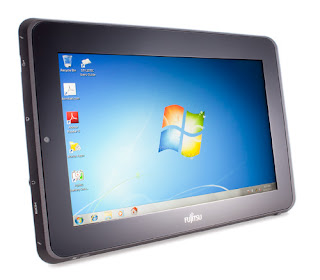 |
Fujitsu Stylistic Q550 |
The 10.1-inch touch screen is covered with chemically strengthened glass, designed to resist scratches and finger stylus taps, and reduce glare. The display features 400 nits and a 1280 by 800 resolution, so you can enjoy the video 720p. A standard size HDMI port, you can also enjoy the content on an HDTV. The display is combined with a mono speaker, and although the sound was terrible, the lack of stereo disappoint some.
The Q550 uses the same digital pen as CL900 Motion Computing (1250 USD Street, 3.5 stars), a pen of power, which takes a single AAAA-yes, four double a battery. For some tasks, like writing pen is a perfect tool. It is also the best way to offset the fact that most of the display shelf, it is difficult to use your fingers to click on icons and scroll bars in Windows 7 A button on the stylus, you can perform the equivalent of a right-click with your mouse without pressing the key maneuver is used on most Windows tablets.
The digital pen also comes with its own set of questions. On the one hand, there is no place to store when not in use, only a place to put a leash. It just kept when not in use, or let it hang freely. The pen will also need the occasional battery replacement and scanner tip. Although it is the advanced replacement comes with the digital pen is not so great to see some of the tablet changes hands and be used all day by several people that can not be programmed on the screen or stylus. Replacement batteries can be purchased anywhere that carries AAAA size battery, but the replacement tips can be found at the site of Fujitsu. Stylus replacement sets sell for $ 25 (direct Fujitsu).
Perhaps the strongest feature of the project are available in the users Q550 is available in battery, which can be removed and the switch off. Most slate tablet PCs and we have seen in recent times to seal the battery inside the frame, and requires a visit from a technician for replacement. Two other exceptions are Toshiba Thrive (Wi-Fi) ($ 579.99 direct, 3.5 stars), which is similar to replace the battery, but it puts you behind the removable back plate and the Panasonic Toughbook U1 Ultra, which is a dual-battery setup, so you can use both batteries and the switch or the other.
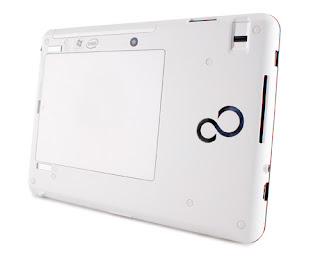 |
Fujitsu Stylistic Q550 |
Feature
Magnesium chassis Q550 has a lot of business-friendly. Many of these features are focused on safety, such as a fingerprint scanner, smartcard reader and embedded Trusted Platform Module (TPM). A USB 2.0 port and a full-size HDMI allow for greater flexibility than most tablets offer consumer devices connecting and external displays. Docking connector allows you to combine dock Fujitsu brand, but are sold separately ($ 69.99 direct, Fujitsu). Connector on the bottom, you can connect to the mains.
Q550 is located on the front of the VGA 640 480 webcam video chat. Another 1.3-megapixel camera behind the tablet provides a more accurate picture, but it is not able to replace the phones camera.
The touchscreen interface is complemented by a selection of physical checks. At the right edge of the platform, there is a physical on / off switch, a dedicated button Ctrl-Alt-Delete and the button turns the screen, which used to change direction. Wireless connections, including Wi-Fi 802.11n and Bluetooth 3.0, you can turn on and off with a dedicated switch. Although these controls are practical, these buttons are grouped on one edge is not the best idea. You should be careful in carrying out the tablet on the side for not wanting to turn the power abruptly or rotate the screen.
The Q550 has a 62GB solid state disk (SSD), which replaces the traditional spinning hard drive in flash memory. In the absence of moving parts to worry, this storage solution is more durable and reliable than standard hard disk spinning. If 62GB of storage space is not enough, the Q550 also has an integrated SD card reader, which allows you to increase the storage space of up to 32 GB per card. The 62GB drive is a relatively free software, with a single tablet of some specific services and a bootable version of Microsoft Office 2010 loaded on it by the manufacturer. Fujitsu also covers style Q550 year warranty with a line of technical support 24 hours.
Performance
Q550 features an Intel Atom Z670, a 1.5GHz single-core processor is optimized for use with the tablets. The final iteration of Intel "Oak Trail" in the model series, Z670 is tailor-made to handle 32-bit version of Windows 7 is the same processor found in the Motion Computing CL900. Processor Features Intel GMA 600 integrated graphics processor, which can be a powerhouse, but it gives more than enough to graphically supported by most programs and web browsing.
In Cinebench R11.5, Q550 scored 0.18 points, almost matching competitors such as ViewSonic ViewPad 10 (0.20 points) and Motion Computing CL900 (0.22 points). But he fell behind Acer Iconia Loss BZ467-W500 (0.39 points), which has an AMD C-50 series APU processor much more sophisticated than what Intel currently offers the tablets. In actual use, I found the Q550 to be quite agile for a Windows 7-compressed, but even the fastest Windows Tablet quickly fall behind competitors that run operating systems that are tailored to the strengths and weaknesses material tablet.
Due to some compatibility issues with software, Q550 could not run our SYSmark benchmark test, but it is not surprising. None of the tablets of Windows, we tested recently, was able to run this test. He did, however, work with the battery test MobileMark 2007. Using the extended 4-cell (38WHr) battery, Q550 lasted 7 hours and 42 minutes on a single charge. He survived the ViewSonic 10 (4:03) and almost beat CL900 Motion Computing (7:24) and iPad2 that lasted 7:30 in the video summary tests. The Q550 is still alive, compared with Panasonic U1 Ultra, which lasted about nine hours with his twin 21Wh battery. Toshiba prosper, which has a user-accessible battery lasted 7:10 Similar tests summary video.
With its collection of works and safety, Fujitsu Stylistic Q550 business functionality successfully marry a factor in tablet form. Although hampered by some of the same problems seen in tablet form many windows, such as lack of a keyboard and a judicious touch user interface clunky, manages Q550 spend a lot of difficulties due to its combination of pen and dedicated control physics. If your needs are not related to an operating system, Apple iPhone 2 is always the best tablet out there. But if your company needs the Windows computer in a portable, hands on the package, Fujitsu Stylistic Q550 one of the best options available to you.
Subscribe to:
Posts (Atom)